Tired of asking from neighbours but they won't approve or you just don't have enough neighbours to ask around? I've had those problems but now my problems are over thanks to cafe gid (gift IDs), a glitch I learnt on the net.
Now, I'm only left with two goals to finish which is the astounding expansion goal 2 and the sushi goal 7. Don't fret even if you only have one neighbour because it will still work.
Just visit the page I have on Cafe World GIDs above or click here LynnasHusna - Cafe World GIDs to learn how to take advantage of this glitch. You can ask absolutely anything as long as it has an ASK button in your goal, even foods too! Goodluck completing your Goals!
Showing posts with label cafe world. Show all posts
Showing posts with label cafe world. Show all posts
Tuesday, August 16, 2011
Friday, March 11, 2011
New FGS Download Link
If you guys have used FGS (Friendly Games Simplifier; originally known as Facebook Games Simplifier), I would like to tell you that now they have updated their version and made it compatible with Mozilla Firefox beta 4 version. However, I have tried beta 4 version on don't like it that much. But you can still download it and give it try.
The link to download are as follows:
FGS for Google Chrome (version 1.1.0.5)
FGS for Google Chrome (version 1.1.0.5) - if the link above does not work
Another solution: right click any one of the links above and click "save as". The new file will appear fgs-X.X.X.X.crx in your computer. Drag & Drop it into Chrome window and it will install.
FGS for Mozilla Firefox beta 4 - Add-ons Gallery
If you don't know how to install FGS for Google Chrome, click here for my tutorial and this link for tutorial on how to use it. I do not have any tutorials yet for Mozilla Firefox at the moment but will do one when Mozilla has released its stabled version of Firefox.
The link to download are as follows:
FGS for Google Chrome (version 1.1.0.5)
FGS for Google Chrome (version 1.1.0.5) - if the link above does not work
Another solution: right click any one of the links above and click "save as". The new file will appear fgs-X.X.X.X.crx in your computer. Drag & Drop it into Chrome window and it will install.
FGS for Mozilla Firefox beta 4 - Add-ons Gallery
If you don't know how to install FGS for Google Chrome, click here for my tutorial and this link for tutorial on how to use it. I do not have any tutorials yet for Mozilla Firefox at the moment but will do one when Mozilla has released its stabled version of Firefox.
p/s: I still cannot access to dafonts website for now. Hope the problem will be solved quickly because I love their collection of fonts so much ^_^
Tuesday, March 8, 2011
Games supported by FGS
Rejoice guys! Now, FGS can support a lot of games in Facebook. So now there's more reason for you to use FGS. Btw, FGS has changed it's name from Facebook Games Simplifier to Friendly Book Simplifier.
Here's a list of games currenty supported by FGS:
- Frontierville
- Farmville
- Mafia Wars
- CityVille
- PetVille
- Treasure Isle
- Cafe World
- Ravenwood Fair
- Restaurant City
- FishVille
- YoVille
- Farmville
- Mafia Wars
- CityVille
- PetVille
- Treasure Isle
- Cafe World
- Ravenwood Fair
- Restaurant City
- FishVille
- YoVille
- Social City
- Zoo World
- Vampire Wars
- City of Wonder
- Texas HoldEm Poker
- Baking life
- Crime City
- Castle Age
- Sorority Life
- Country Life
- Paradise Life
- Zoo World
- Vampire Wars
- City of Wonder
- Texas HoldEm Poker
- Baking life
- Crime City
- Castle Age
- Sorority Life
- Country Life
- Paradise Life
Tuesday, October 19, 2010
Bonus Collector for Cafe World, Treasure Isle, Frontier Ville, Farm Ville and Mafia Wars (Part III)
Tutorial on how to use FGS




The gift has been collected.

In the neighbours list choose one/few neighbours that you want to send gifts to.



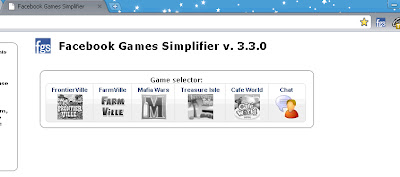
First of all, make sure that you have logged-in to your Facebook account. If you haven't, the FGS icon will have an X right next to it. It looks something like this.
Make sure you have logged-in to your Facebook account.
If you haven't logged-in, there's no harm to it. Just click on the logo and it will direct you to the Facebook log-in page. This is because FGS will need to access all your posts and also your friends post for any bonuses.
REMINDER: If you don't feel secured about logging-in via FGS link, make sure that you are already logged-in to your Facebook account prior to opening FGS.
Second, click on the FGS button. It is on the upper right hand corner of your Google Chrome.
Click here.
FGS will open in a new tab as shown below.

Click on each individual game to enable bonus collection from your Facebook as so.

Then tick on the box besides "Game enabled". Do the same for the rest of the game that you play. Then click refresh and wait for it to collect bonuses. This is how FGS will look like after collecting bonuses and requests on walls.

For Frontier Ville, I have one pending request from a friend who needs a measuring tape.
How to receive bonuses or send request

Bonuses/requests are the ones collected from your friends wall. Click on the "Receive all bonuses" button to receive bonuses shown and/or send things requested by friends. A tick will be shown when the request is fulfilled.

Request sent.
How to receive pending gifts
To receive gifts, click on the "Show pending gifts" button in any game you choose just like shown below.

I have one gifts given to me from a kind neighbour.

Click on the receive all gifts to accept gifts.

How to send gifts (only for Frontier Ville and Farm Ville)
You can also send gifts to your neighbours in Frontier Ville and Farm Ville. Sending gifts to other games have not been added yet. So just hope that flies, the developer of FGS will make that option available for all games. Here is how to send gifts:
a) Sending gifts individually
Click on the "Send free gifts" button, then choose the gift that you want to send.

In the neighbours list choose one/few neighbours that you want to send gifts to.

I have selected one recepient.

Click "Send free gifts" button.
Wait for three to five seconds (depending on how many gifts you're sending). When its done, you can see that the persons name on the Neighbours list is gone (as you can only gift once per day).
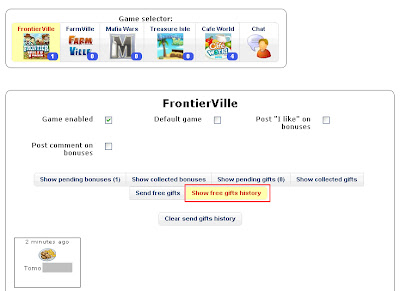
To see gifts that you have already sent, click the "Show free gifts history" button

Gift sent.
How to send gifts to favourite friends
If you have a list of neighbours of more than 30 friends, you can select a few friends (as there is a quota on how much gifts you can send to per day) to be included in your favourites list. This option enables you to send gifts to them without having to choose everyday. Their names will appear automatically in the favourites list thus sending gifts to them is a breeze. I really love this option as I would love to give gifts to friends who have helped me in sending gifts, bonuses or helped me with my request. Here is how:
Click on the star next to your neighbours name in the Neighbours list and their names will appear in the Favourites send to list.

Friends name included in the favourites send to list.
Click on the "Select favourites" button first before you click on the "Send free gifts". Wait for a few seconds before the list disappear (to show that you've sent them).
There you go. That's just the basic tutorial on how to use FGS. If you need to know more or have any questions regarding this, please don't hesitate to leave me comment(s) and I will try my best to answer them or better, post another tutorial. Happy FGS-ing guys! :)
p/s: I'm not the developer for FGS so if there's any problem with FGS I'm afraid I can't help but I know very well that flies is working hard trying to fix it and improving it. Thus any donations for flies in improving FGS is very much encouraged and welcome :D To donate, click on the donate button on the upper-left hand corner of FGS tab.
Monday, October 18, 2010
Bonus Collector for Cafe World, Treasure Isle, Frontier Ville, Farm Ville and Mafia Wars (Part II)
In my previous post here I talked about the bonus collector. So here goes the tutorial for installing it.
First of all you need a Google Chrome. If you don't have one, here's the link to download Google Chrome and download as shown below.
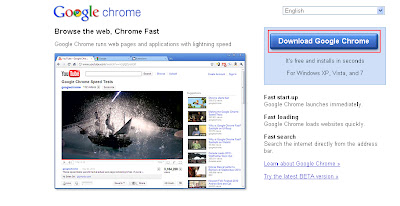


First of all you need a Google Chrome. If you don't have one, here's the link to download Google Chrome and download as shown below.

Click Download Google Chrome.
IMPORTANT: Install it and wait for it to open. The second step requires you to open the chrome extension in Chrome, otherwise it won't work.
Second, go to the Google Chrome extension called Facebook Games Simplifier here and install the extension as shown below.
Second, go to the Google Chrome extension called Facebook Games Simplifier here and install the extension as shown below.

Click install.
A pop-up will prompt you to install the FGS as shown below:

Choose to install.
After successfully installing FGS, a notification will pop-up on the upper right of your Chrome as shown here.

As shown, I have seven pending bonuses/requests.
That's all for this post. Catch me in the next post on how to use the FGS.
Sunday, October 17, 2010
Bonus Collector for Cafe World, Treasure Isle, Frontier Ville, Farm Ville and Mafia Wars (Part I)


I just love to play with Zynga's game like Cafe World, FrontierVille and Treasure Isle. But I always end up with so little time to collect bonuses and send gifts to friends each day since I spend the whole time playing three games. At first I thought the Bonus Checker was the solution to my problems as it collects bonuses published on my friends wall but it turns out to be time consuming as I have to I've got accept the gifts one-by-one manually.
However, recently I stumbled upon one of (I say) the best application ever for collecting bonuses AUTOMATICALLY plus I get to send gifts too! I can also send any (I call them) construction tools to my friends for frontierville and not just limited to two construction tools such as nails and bricks.
As I have been promoting all this while in my blog, the application is FREE peeps :) However, donations for the developer are most welcome. Besides that, the application also support Mafia Wars and Farm Ville besides Cafe World, FrontierVille and Treasure Isle. The application deserves two thumbs up from me.


What application is it, you ask?? No, it's not Zynga's toolbar.
You just have to wait and stick to my next post to find out ;)
*sorry guys, can't blog about the application yet coz I have problems with the computer. Can't print screen to post pictures for tutorials on how to install and use the application. Will post up the next entry within this week.
Subscribe to:
Posts (Atom)
